
A flight booking system (or flight reservation portal) lets travelers search, book, and pay for airline tickets through one online interface phptra...
A flight booking system (or flight reservation portal) lets travelers search, book, and pay for airline tickets through one online interface phptravels.com. It typically has a front-end website (HTML/JS) where users enter flight details and a back-end (PHP code on a web server) that handles data and logic. The back end connects to a MySQL database to store users, flights, and bookings, and often calls external APIs to get real-time flight data. Using PHP and MySQL is cost‑effective and widely supported. In fact, over 79% of websites use PHP and it works seamlessly with MySQL to manage real-time flight availability and user interactions moldstud.com. Below we outline what you need, the workflow, API integration, and why PHP/MySQL are a good fit for a travel booking system.
What You Need to Build a Flight Booking Website
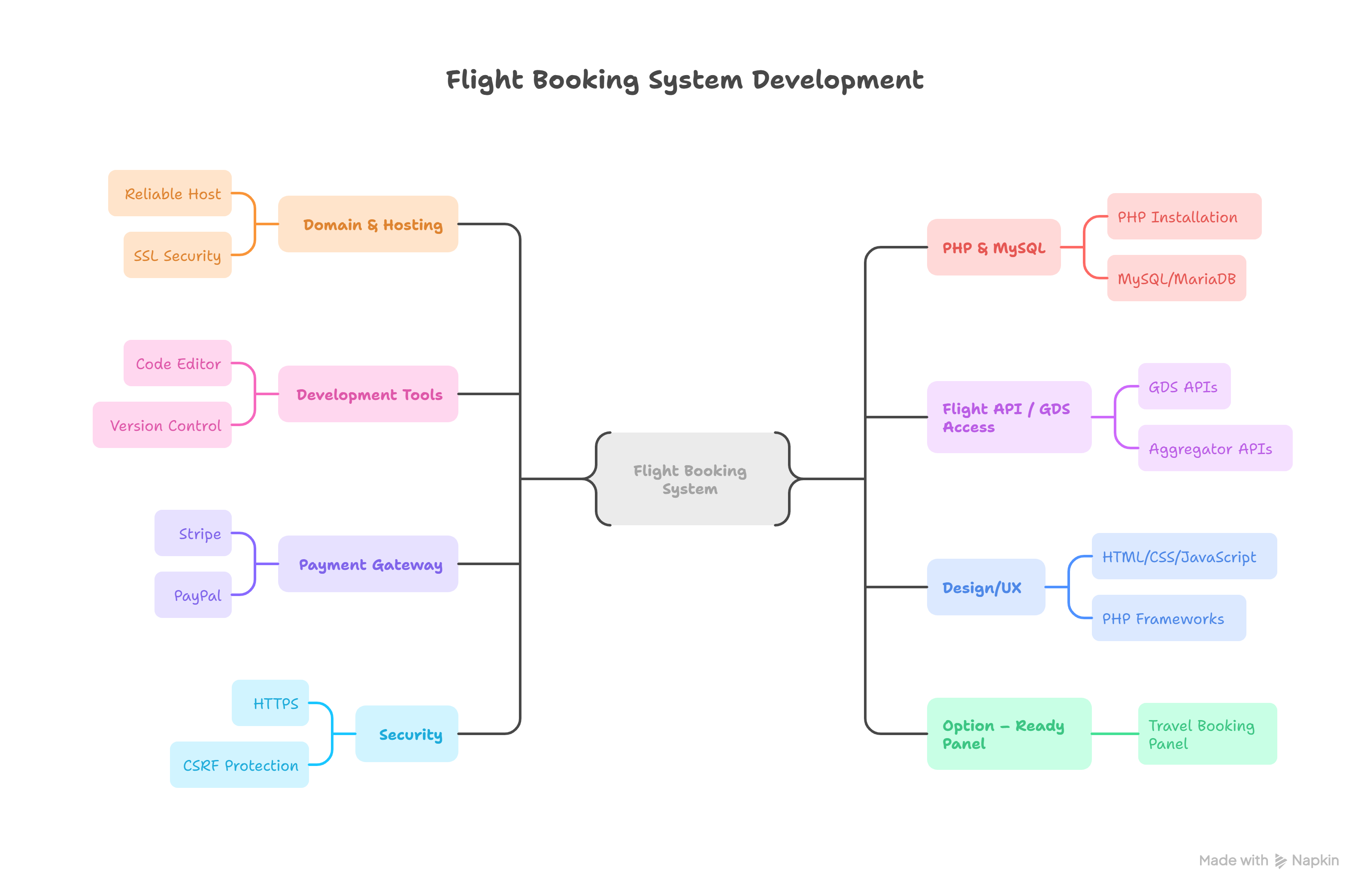
Domain & Hosting: A domain name and a web hosting account that supports PHP 7/8 and MySQL (Apache or Nginx server). Choose a reliable host with SSL for secure bookings.
PHP & MySQL: Install PHP (open-source, easy to deploy) and MySQL or MariaDB. These power the back end, handle data queries, and store everything from user profiles to flight inventory moldstud.commoldstud.com.
Development Tools: A code editor (e.g. VS Code), version control (Git), and API testing tools (Postman or cURL) for development.
Flight API / GDS Access: Create accounts with one or more flight data providers. Popular options are GDS APIs like Amadeus, Sabre or Travelport (enterprise travel systems) or aggregator APIs like Skyscanner, Kiwi or FlightAPI. For example, you can sign up for an Amadeus Developer account to get API keys for flight search and booking phptravels.com. These APIs supply schedules, fares, and availability in real-time.
Payment Gateway: A payment processor (Stripe, PayPal, etc.) to handle customer payments. PHP libraries are available for secure transactions moldstud.com.
Design/UX: A user-friendly front-end (HTML/CSS/JavaScript). This is where travelers enter origin, destination, dates, etc. You can use a PHP framework (like Laravel) or plain PHP with a template system.
Security: Enable HTTPS (SSL), use prepared statements for database queries, and follow best practices (sanitization, CSRF protection, etc.).
Option – Ready Panel: To skip coding, consider a ready-made booking panel. To skip the tech hassle and buy a ready-made flight booking panel, visit https://travelbookingpanel.com/.
Step-by-Step Workflow
When a traveler visits your PHP travel site on a laptop or mobile, they enter trip details and search for flights. The basic booking flow is:
User Search: The visitor fills a form with origin, destination, dates, and passengers. The front-end sends this data to your PHP back end.
Flight Search API Call: Your PHP code uses an HTTP client (cURL, Guzzle, etc.) to query a flight API or GDS. For example, you might call Amadeus’s Flight Offers Search API with the user’s criteria phptravels.com. This happens in real time, giving up-to-date results (seat inventory, schedules, prices) from hundreds of airlines oneclickitsolution.com.
Display Results: The API returns a JSON of flight options (airlines, times, fares). PHP processes this JSON and shows the list of available flights to the user on the web page.
Select and Confirm: The user picks a flight. Your system then calls a “fare confirmation” endpoint (or similar) to lock the price, ensuring seats are still available. The user enters passenger details (name, email, etc.).phptravels.com
Finalize Booking: Your PHP back end calls the flight booking endpoint of the API, sending passenger info and flight info. The provider returns a booking reference or PNR, which you display to the user phptravels.com. At this point the flight is reserved under the traveler’s name. Your database should record this booking (linking user ID to flight ID and reference).
Payment Processing: Redirect the user to a payment page or integrate an on-site payment form. After successful payment, update the booking status in MySQL (e.g. mark it “paid” in a transactions table). Common gateways like Stripe or PayPal have PHP SDKs for easy integration. Be sure to test payments with sandbox accounts phptravels.com.
Confirmation & Notification: Send the traveler an email confirmation (including the booking reference and e-ticket). You might also generate a PDF ticket or mobile pass.
Each step is typically handled by a specific PHP module or class (search controller, booking controller, payment handler, etc.). Database tables (users, flights, bookings, transactions) must be well-indexed on fields like origin/destination and dates to keep searches fast phptravels.commoldstud.com.
Integrating GDS or Flight APIs
Flight APIs power real-time search. For example, an airline API returns flight options and prices for your site. To get actual flight data, your site must integrate with a flight API or Global Distribution System (GDS):
Popular Flight APIs: Amadeus, Sabre, Travelport (GDS) are industry leaders that connect to thousands of airlines. Other options include Skyscanner, Kiwi.com, FlightAware, or regional suppliers. Each has a developer portal for API keys. For instance, Amadeus offers Flight Offers Search, Fare Retrieve, and Flight Create (booking) APIs phptravels.com.
API Integration: Use PHP’s cURL or an HTTP client like Guzzle to send requests. Most APIs use REST/JSON. For example, you’d send a POST with origin/destination to the Amadeus search endpoint and include your API credentials in headers phptravels.com. The API returns a JSON of flight data (airline codes, times, prices). Your PHP code parses this JSON to show results.
Multi-GDS Aggregation: For maximum coverage, some sites integrate multiple suppliers. A single GDS like Amadeus gives access to global schedules; adding Sabre or Travelport adds more airlines oneclickitsolution.com. In fact, multi-GDS integration lets your booking engine display thousands of flight options in one unified list oneclickitsolution.com. This means travelers see all possible routes and fares in one search, sorted by best price or duration.
Real-Time Results: With proper API calls, search results are live. Using GDS APIs (or even low-cost carrier APIs) ensures results update instantly oneclickitsolution.com. This real-time availability is critical: seat inventory and prices often change by the minute. By leveraging an API, your site can offer dynamic pricing and true availability, which builds trust and avoids errors.
Data Fields: The JSON from flight APIs usually includes origin/destination codes, departure/arrival times, airline names, flight numbers, layovers, and fares. Use this data to populate your database flights table (or cache it) with foreign keys to an airlines table. Always respect API rate limits and cache common searches for a short time to improve speed.
Example Workflow: When a user searches for JFK to LAX on 2025-10-01, your PHP code might call the Amadeus “Flight Offers Search” API. It sends {origin: "JFK", destination: "LAX", date: "2025-10-01"} and receives a list of flights. Then user selects one, and you call “Flight Create” to confirm the booking and get a PNR phptravels.com.
By integrating an airline API, you effectively connect your PHP travel website to global flight inventory. According to industry sources, integrating APIs like Amadeus or Sabre allows travel agencies to tap a consolidated database of thousands of flights without building each airline link themselves oneclickitsolution.com. This is the core of any modern travel booking system.
Benefits of PHP and MySQL
Wide Adoption & Cost: PHP and MySQL are open-source and free. They power a large majority of websites moldstud.com. That means hosting is cheap and there’s a big developer community. For a travel agency, this translates to lower development costs and many available libraries/plugins.
Performance & Speed: PHP is a server-side language well-suited to database-driven sites. Paired with MySQL, it can be very fast. In fact, by optimizing queries and using proper indexes (especially on search fields like city codes and dates), you can reduce response times significantly moldstud.com. For example, efficient MySQL queries can cut page load time in half, improving user experience moldstud.com.
Flexibility: PHP makes it easy to add new features (like user accounts, multi-city search, fare rules). Frameworks (Laravel, Symfony) or plain PHP both work. You’re not locked into a black-box system – you can customize the booking engine, UI, and database as needed for your business.
Hosting & Tools: PHP/MySQL apps run on almost any web host. You can start small and scale up. Many management panels (cPanel, Plesk) have one-click PHP environments. Also, there are PHP travel booking scripts and CMS plugins that can jump-start development.
Community & Support: Finding PHP developers is easy and many tutorials exist (like this one!). If you run into issues, the vast PHP community can help. There are also prebuilt PHP travel website scripts (e.g. CodeIgniter or Laravel templates) that handle booking flows – you can use them as a foundation.
In summary, PHP/MySQL form a reliable “LAMP” stack for a travel booking site. They easily handle the travel booking system logic and scale to thousands of users. Plus, MySQL’s relational model is perfect for the normalized data (users, flights, bookings, transactions) needed in airline reservations phptravels.com.
Conclusion
Building your own flight booking website in PHP and MySQL involves setting up a web server, designing the database (flights, users, bookings, etc.), writing PHP scripts for search/booking, and integrating flight APIs for real data. By following a clear workflow – user search → API lookup → selection → booking → payment – you can launch a fully functioning booking portal. Using PHP/MySQL ensures a cost-effective, flexible solution that’s easy to host and maintain. However, the project does require programming effort and API integration work.
If you prefer a quicker path, you might consider a ready-made booking system. These panels come pre-configured with search and booking logic so you can go live almost immediately.
Ready to skip the tech hassle? To skip the tech hassle and buy a ready-made flight booking panel, visit https://travelbookingpanel.com/.
By following these steps or using an existing platform, any travel agency owner can offer an online travel booking system with real-time flight search, secure payment, and full control over branding.
FAQ
Q: Can I build a flight booking website without coding?
A: To some extent, yes. You can use website builders or CMS platforms (like WordPress with booking plugins) to create a basic travel site without deep coding. Some hosted platforms or no-code tools advertise “booking website” solutions. However, fully integrating airline data usually requires technical work. For real-time flight search and bookings, coding or a ready-made script is needed. An alternative is to purchase a pre-built flight booking panel (see above) or use a WordPress theme/script that already has booking features.
Q: Which API is best for flight search?
A: For enterprise use, GDS APIs like Amadeus, Sabre, or Travelport are industry-standard (they cover most airlines globally) oneclickitsolution.com. They provide the most comprehensive and up-to-date data, but often require registration and possibly fees. For a simpler setup or smaller budgets, aggregator APIs like Skyscanner or FlightAPI can be easier to use and cheaper, as they pool multiple airlines into one endpoint flightapi.io. Skyscanner’s API, for example, is popular for quick integration and supports worldwide flight search. In summary: use a GDS (Amadeus/Sabre) for full coverage and reliability oneclickitsolution.com; use a flight aggregator API (Skyscanner, Travelpayouts, etc.) for simplicity and quick setup.
Q: Can I customize the booking process (e.g. add hotels or cars)?
A: Yes. Once your PHP/MySQL system can search and book flights, you can extend it. You could integrate hotel and car rental APIs similarly, or use travel packages scripts. Modular design and a good architecture (with clear tables for each service) will let you add these features later.
Q: How secure is a PHP/MySQL travel site?
A: As secure as you make it. Use HTTPS, properly validate inputs, use prepared statements for SQL, and keep PHP/MySQL updated. Both PHP and MySQL have strong security track records when configured correctly. Also choose secure payment gateways. Adding these protections will keep user data and transactions safe on your flight reservation portal.
Q: What about updates and maintenance?
A: You’ll need to maintain server security, update your PHP code for any API changes, and monitor system performance. Adding caching (Redis, memcached) and regular database backups will keep things running smoothly under load. Over time, you may want to optimize your MySQL indexes and consider load-balancing if traffic grows.
By starting with PHP and MySQL, you give yourself a flexible foundation to grow your airline API integration and travel portal features as needed.
Own Your Travel Platform. Forever.
Buy once, own forever. Full source code · No monthly fees · No hidden charges.


.png)